Getting words down
Murmurtale
A Mac menu-bar app that turns speech into fiction formatting: hold a key, speak, and the text lands at the cursor with dialogue in quotes and a new paragraph when the speaker changes. The public pages say it punctuates and paragraphs what you said and does not add or rewrite words. Cloud mode, the default on Pro and the trial, sends audio through their backend. English only, Apple Silicon, macOS 14 or later, and not offered to EU, EEA, or UK residents.
Best for
Fiction writers on an Apple Silicon Mac, in the United States, who dictate scenes and want dialogue formatting without a model that rewrites the prose.
Pricing
Freemium. Free download. No account: 5,000 on-device words, once. Free account: 5,000 on-device words a month. Pro, checked 22 October 2026: $14.99/month or $119/year, with 60,000 cloud words a month (called fair use) and unlimited on-device dictation. New accounts get one trial of 14 days or 20,000 cloud words, whichever comes first, with no card. Signup is United States only.
Checked 22 October 2026. Plans move. The vendor's page wins an argument with this one.
Good to know
At a glance
- Availability
- United States only. The privacy policy says it is not offered to residents of the EU, EEA, or UK.
- Platforms
- Mac, Apple Silicon (M1 or newer), macOS 14 or later. Direct .dmg download, not the Mac App Store. iPhone and iPad are described as not available yet.
- Languages
- English only, on-device and in the cloud. Dialogue formatting follows US English manuscript conventions.
- Launched
- New: launched October 2026
- Independent reviews
- No independent reviews found as of 22 October 2026.
- AI training and retention
- xAI, Groq, and OpenAI process cloud requests under their own terms. The privacy policy sets no retention period for that audio or text and does not say whether those providers train on it. Terms version 1.2 dropped a blanket promise about provider retention and training. On-device audio is not sent.
New tools are checked again three months after the Checked date above.
In-depth review
Murmurtale review
Last checked 22 October 2026 against the vendor's public pages. Prices and features change; check the vendor before you buy.
Writer's Toolbelt review
Murmurtale
Mac dictation for fiction. It formats dialogue and paragraphs. The pages say it does not write the scene. This review is from those pages.
- to download. The trial asks for no card
- Pro per month, or $119 a year
- cloud words a month on Pro, fair use
What it is
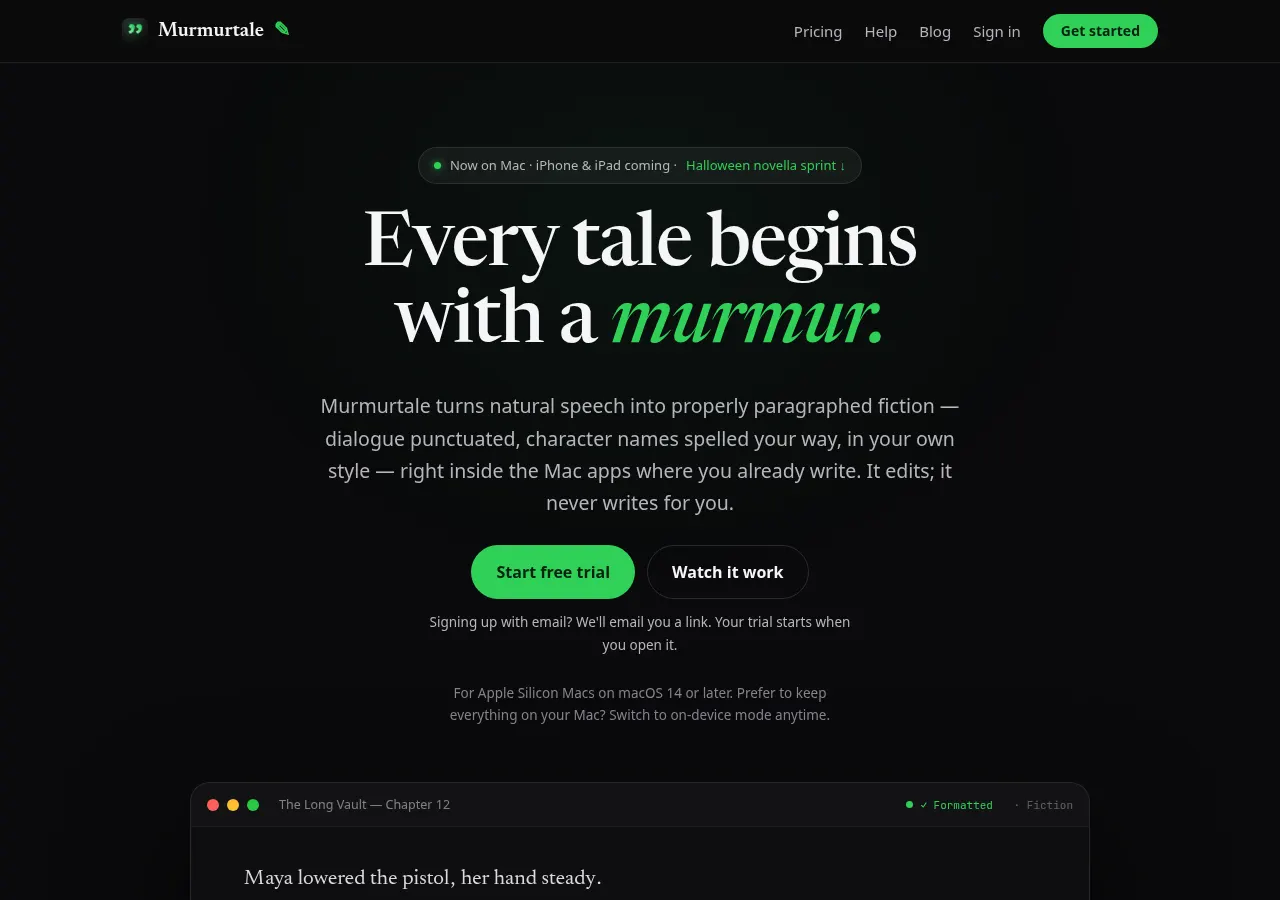
Murmurtale is a menu-bar dictation app for fiction writers on a Mac. The home page's line is that every tale begins with a murmur, and that the app turns natural speech into paragraphed fiction inside the Mac apps where you already write. You click into a text field, hold a key, speak, and release. The text is supposed to land at the cursor. In Fiction mode the pages promise dialogue in quotes, a new paragraph when the speaker changes, and italics for a thought you tag ("she thought") or mark out loud with "in italics".
This review is based on the public pages listed below, read on 22 October 2026. We did not run the app, open an account, or dictate a sentence into it. Nothing here is a hands-on grade of accuracy, speed, or whether a name comes back spelled right.
The company on the terms and the privacy policy is Brad Pierce Enterprises LLC, at 8401 Mayland Dr Ste S, Richmond, VA 23294. Support is support@murmurtale.com. Terms version 1.5 and privacy policy version 1.6 are both effective 17 October 2026. The download page lists the live Mac app as 1.1.5, build 1026. Those dates are the public record this page uses for a launch month of October 2026. The pages do not give an earlier release date.
The home page says you will find no invented reviews and no inflated numbers. A search on 22 October 2026 did not turn up an independent review. The public thread that did appear is the developer's own post on MacRumors. That is an announcement, not a review by someone else. A different Mac app, MurmurType, shows up in dictation roundups. It is not this product.
Who it's for
- Fiction writers who already dictate, or who want to, and who are tired of a transcript that is one block with no quotes. The home page calls that the reformatting tax.
- Writers who want the words to stay their words. The pages repeat that the app formats and does not invent sentences, continue a scene, or put lines in a character's mouth.
- People on an Apple Silicon Mac, in the United States, writing in English. That is the whole supported set, as the download page and the privacy policy print it.
It is a weak fit on an Intel Mac, on Windows, in a browser, or on a phone. iPhone and iPad are named as coming later. The home page says they are not available, and that the page will not pretend otherwise. It is also a weak fit if you live in the EU, the EEA, or the UK: the privacy policy says the product is not offered to residents there. It is a weak fit if you need the dictation to rewrite a rambling sentence into a cleaner one. That is a different product, and the pages here are written against it.
Key features in practice
The features below are what the home page, the download page, the local-versus-cloud help page, the terms, and the privacy policy say the app does. They are the vendor's description, not a session in the app.
- Hold a key, then the cursor. The home page says you click into a text field in the app you already use, hold a key, speak, and release. The finished text lands where the cursor was. No separate writing window. The download page says the two permissions are Microphone and Accessibility, and that anything else in a dialog is not Murmurtale.
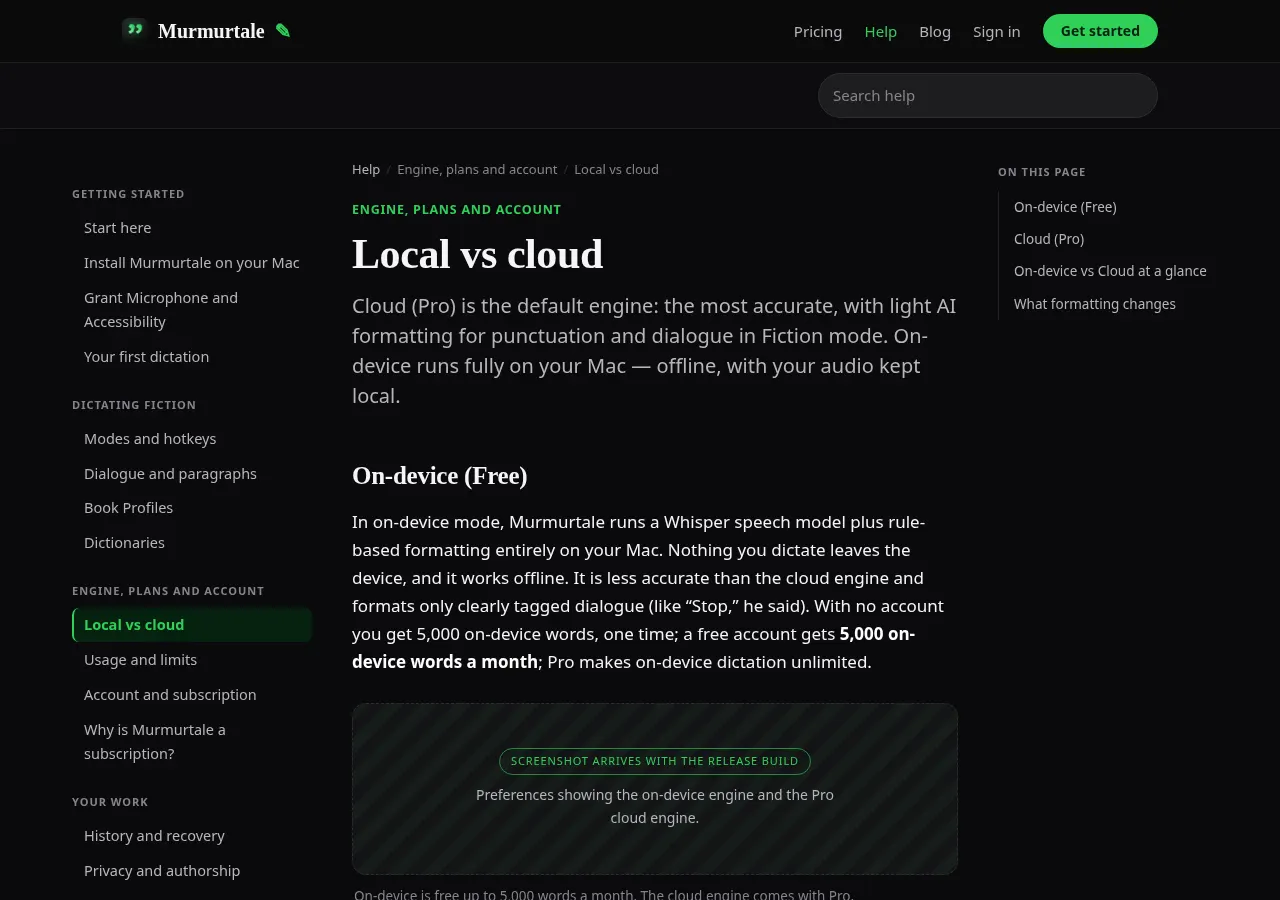
- Fiction mode versus Plain mode. Fiction mode, with the cloud engine, is the one that quotes speech, breaks a paragraph on a new speaker, and italicizes tagged thoughts. Plain mode gets no AI formatting. On-device mode also gets no AI formatting, and the help page says it quotes only a line that carries a tag such as "she said" or "he asked".
- What "never changes your words" includes, and what it does not. The help page says the app may change only punctuation, capitalization, quotation marks, paragraph breaks, and italics, and that it checks every result word for word and keeps your words where a model changed one. The same page says "uh" and "um" are dropped by the speech engine itself, and that spoken commands and dictionary spellings are applied on the Mac. A dropped "um" is a change. The pages still say the app does not add, remove, or rewrite the words you meant as prose. We did not measure that check.
- Dictionaries and genre. You can add character names, places, and invented terms, and toggle dictionaries per book. The home page shows genre presets (thriller, romance, fantasy, science fiction, literary) whose examples differ by punctuation and paragraph rhythm, not by a new plot. Invented names are described as spelled from the glossary. Treat the examples as the vendor's illustrations. The home page labels its own before-and-after "not a screenshot".
- On-device engine. The help page says on-device mode runs a Whisper speech model plus rule-based formatting entirely on the Mac. Audio stays on the machine and works offline after the model has downloaded. It is described as less accurate than the cloud, especially on names. With no account you get 5,000 on-device words, once. A free account gets 5,000 on-device words a month. Pro makes on-device dictation unlimited.
- Cloud engine, the default on Pro and on the trial. Audio streams, while you hold the key, through Murmurtale's backend for speech recognition. Silence before you speak is not sent. The privacy policy names the path. Google Cloud hosts the backend. xAI receives the raw audio for live recognition, and the dictionary is not sent to xAI. If xAI does not answer promptly, that dictation's audio goes to Groq, with a language code and up to 100 names or dictionary terms as hints. If neither is available, the Mac transcribes it. Fiction-mode formatting sends the recognized text, the selected genre, and up to 600 characters of the preceding passage to OpenAI. A second OpenAI transcription path exists on the backend and runs only when the app requests it. The privacy policy says the live app, 1.1.5, does not request it, and that 1.1.6 may. You do not paste in an API key. The help page says the keys are the company's.
- Download, not the Mac App Store. The download page offers a notarized .dmg, Murmurtale 1.1.5, 8.1 MB, with a published SHA-256, and says the app checks for signed updates about once an hour. The installed size is the other number: about 700 MB free, because the on-device model is about 632 MB and is downloaded from Hugging Face on first launch. Hugging Face sees the IP address of that download. The app does not send dictated audio or text there. Intel Macs are not supported. The requirement is Apple Silicon, M1 or newer, and macOS 14 or later.
Pricing (checked 22 October 2026)
The figures below are on the home page, the start page, the download page, and section 2 and section 3 of the terms.
| Plan | Price | What the pages include |
|---|---|---|
| No account | $0 | 5,000 on-device words, one time. No cloud formatting |
| Free account | $0 | 5,000 on-device words a month. Sign in with Apple, Google, or email |
| Pro trial | $0 | One trial per account. 14 days or 20,000 cloud words, whichever comes first. No card. The 14 days start when you confirm email, or when you sign up with Apple or Google |
| Pro monthly | $14.99/month | Cloud transcription and Fiction formatting. Unlimited on-device. 60,000 cloud words a month, called fair use. If the cloud allowance runs out, dictation continues on-device until the month resets |
| Pro yearly | $119/year | The same Pro allowance. The home page says save 34%, about $9.92 a month |
Pricing at a glance
Billed monthlyBilled yearly
- Free5,000 on-device words a month with an account; 5,000 once without oneFree
- Pro$119/year. 60,000 cloud words a month plus unlimited on-device$14.99/mo$9.92/mo
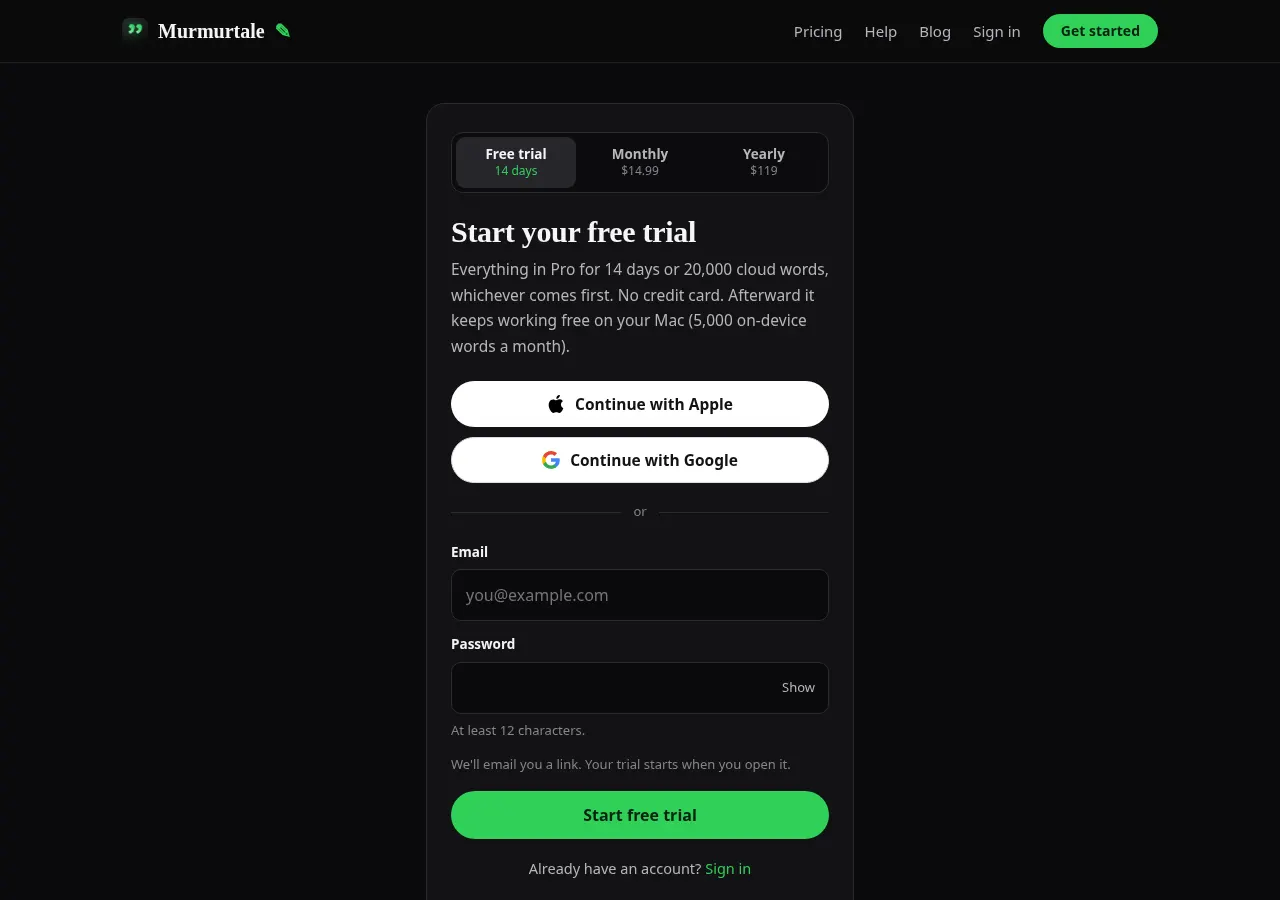
Every cloud word counts toward the trial, including retakes, so the trial can end before the manuscript itself is 20,000 words. The take you are on finishes. When the trial ends, nothing is charged and the account becomes the free on-device plan. Payments go through Stripe. The home page says Murmurtale never sees the card. Subscriptions auto-renew until you cancel. Access continues through the period you already paid. Refunds are discretionary. Fees are otherwise non-refundable except where the law requires it. The terms say you must be at least 18, or the age of majority where you live if that is higher.
The start page's country field, on the capture for this review, offered United States. The home page says available in the United States only. The privacy policy is stricter than a payment-region note: Murmurtale is not currently offered to residents of the European Union, the European Economic Area, or the United Kingdom. The server makes the eligibility decision. Existing users can still sign in where permitted.
The home page, on this check, also tied the trial to a Halloween sprint: dictate a horror novella, 20,000 words by 31 October, and the trial words are the budget. That is a promotion on the page we read. It is not a second price.
What this review did not do
There is no hands-on section. We did not install the .dmg, grant the microphone, hold the key, or dictate a passage. The scorecard further down is an editorial reading of the public offer: how specific the formatting claim is, how narrow the eligible writer is, and how plain the privacy pages are. It is not a measurement of word error rate.
Using it as a writer
- Read the residence line before you make an account. If you live in the EU, the EEA, or the UK, the privacy policy says the product is not offered to you. The start page asks for country of residence, and the server decides.
- Decide which engine you are willing to use before the trial. The trial and Pro default to the cloud. On-device mode is the one that keeps audio on the Mac, and it is the weaker formatter: tagged dialogue only, and less accurate on names, by the help page's own comparison.
- Put names in a dictionary before you care about the spelling. The cloud path can send up to 100 of those terms to Groq as hints. It does not send the dictionary to xAI. On the device, the glossary is local.
- Treat Fiction mode as punctuation and paragraphing, then read the result. The terms say transcription and cleanup are AI-generated and can be wrong, and that you should review important output. The authorship claim is the vendor's, plus a word-for-word check the pages describe and we did not watch.
- Know what happens at 60,000 cloud words. The pages say dictation does not stop. It falls back to the on-device engine until the month resets. "Fair use" is the label on that 60,000. A separate fair-use rule, beyond the number, is not printed.
Strengths
- The job is narrow, and the pages stay on it. Dictation into the app you already use, with fiction formatting, and a repeated refusal to write the scene. That is a clearer product than a chat box that will also draft the chapter.
- The split between engines is written down. On-device versus cloud, what each one quotes, what leaves the Mac, and what the fallback is if the cloud is down. The help page puts that in a table instead of a slogan.
- The providers are named. xAI for the live stream, Groq as the batch fallback, OpenAI for Fiction-mode formatting, Google Cloud for the backend, Stripe for the card, Hugging Face for the model download. You do not have to guess the brand behind "our cloud".
- The prices and the allowances are on the page. $14.99, $119, 5,000, 20,000, 60,000, 14 days, no card. The yearly page even prints the monthly equivalent it wants you to use.
- The download is a direct, notarized .dmg with a checksum, and the page says Intel Macs are out. A requirement printed in advance is better than a surprise after a store install.
- You keep the rights. Section 5 of the terms says you retain the audio and the text, that the transcript is also your content, and that the company claims no ownership of what you dictate or of the output.
Writer's Toolbelt editorial scores
Murmurtale scorecard
6.4/10
- Fiction formatting, as described8/10
- Keeping the writer's words7/10
- Who can actually use it3/10
- Privacy clarity6/10
- Price clarity8/10
Weaknesses
- Almost nobody in this directory's wider audience can install it. Apple Silicon, macOS 14 or later, English only, and a United States account. The privacy policy excludes EU, EEA, and UK residents. iPhone and iPad are not shipping. That is a real product, and a small door.
- The cloud path has no training or retention promise. Terms version 1.2 dropped what the changelog calls a blanket promise about every cloud provider's retention and training. The current terms say xAI, Groq, and OpenAI process requests under their own terms. The privacy policy says it does not set a retention period for cloud request content. "Policy does not say" is the accurate line, and it is why a writer with an unpublished book should prefer on-device mode until they have read those providers' terms themselves.
- The authorship claim is unmeasured here. The pages describe a word-for-word check and also describe a speech engine that drops "uh" and "um", plus genre presets that change punctuation. Those can all be true together. This review cannot tell you how often a word still moves.
- The EULA is not a page. The terms say use of the app is also governed by an EULA "not yet published as a separate page". The terms you can read cover the online service.
- Refunds are discretionary, and the subscription renews until you cancel. The trial does not ask for a card, which limits the surprise. The renewal still needs a date in the calendar.
- No independent review was available on 22 October 2026 to set beside these pages. The only thread found was the company's. A new dictation app with a cloud default is exactly the sort of tool that usually earns a hands-on writeup. It has not had one that we could find.
- Diagnostics are on by default. The privacy policy says they can be turned off. Product analytics is opt-in. Local history defaults to 30 days, with an off switch. Those controls exist. The default is still on for diagnostics.
How it compares
These are not listed as separate tools here. The comparison uses their public pages only, read the same day, and it is about the job each page claims. We did not install them either.
- Murmurtale vs macOS Dictation. Apple's support page says Dictation types where you can already type, on a Mac. In supported languages it can insert commas, periods, and question marks as you speak, and you can say "new line" or "new paragraph". Keyboard settings are where you check whether general text dictation stays on the device or goes to Siri servers. Sharing audio recordings to improve Siri and Dictation is a choice at setup, and it can be changed later. Dictation is not available in every language or region. Apple's page does not describe quotes around fiction dialogue or a new paragraph per speaker unless you ask for the paragraph. The price is the Mac you already have. Murmurtale's pages are selling that missing fiction pass, on a narrower set of Macs, with a cloud default on the paid plan.
- Murmurtale vs Wispr Flow. Wispr Flow's home page says it is on Mac, Windows, iPhone, and Android, and that it turns speech into polished writing in every app. Its own example takes a rambling, self-correcting sentence and returns a shorter email that was not what the speaker literally said. It says it supports 100+ languages. The free allowance on that page is 2,000 words a week, with no card. It also says your data is never sold, and that you choose whether data is used to help improve Flow. That is a cleanup tool. Murmurtale's pages say the opposite of a rewrite: punctuation and paragraphs only. If you want the ums removed and the sentence recomposed, Wispr's page is the closer claim. If you want the sentence left alone and the dialogue broken into paragraphs, Murmurtale's page is the closer claim.
- Murmurtale vs Superwhisper. Superwhisper's home page says it runs on macOS, Windows, iOS, and Android, works offline, and pastes into the app you are using. Custom modes can set tone and formatting and can use models it names as GPT, Claude, or Llama. Intel Macs, it says, work best with cloud models. Offline models "only run really well" on Apple Silicon. You can try Pro features for 3,000 words, then a free tier remains. The page does not describe a fiction rule that quotes dialogue and refuses to change words. It describes polished text and modes you define. Murmurtale is the narrower fiction formatter, with a published US-only signup and a named provider list. Superwhisper is the broader voice-to-polished-text app, including machines Murmurtale will not install on.
Verdict
On the pages, Murmurtale is a real Mac app with a notarized download, a printed price, a named company in Virginia, and a formatting job that fiction dictation actually needs: quotes, a new paragraph per speaker, names from a glossary, and a stated refusal to write the book. The limits are printed too. English only. Apple Silicon. macOS 14 or later. United States signup. Not offered to EU, EEA, or UK residents. Cloud by default on the trial and on Pro, through xAI, with Groq and OpenAI behind specific steps, under those providers' own terms, and with no retention or training promise in Murmurtale's policy.
Use the on-device allowance if the cloud terms are the part you will not accept. It is free, it is weaker, and the pages say so. Use the trial, with no card, only if you are in the country the form allows and you are willing to read the result yourself. Do not buy the year because a landing page promised your words would not move. This review did not watch them.
The scores are a reading of that public offer. A later independent review, or a version past 1.1.5, could land somewhere else.
FAQ
Is Murmurtale free? The download is free. With no account you get 5,000 on-device words, once. A free account gets 5,000 on-device words a month. The Pro cloud engine is not part of that free allowance. A new account can use Pro for 14 days or 20,000 cloud words, whichever comes first, without a card.
How much is Pro? On 22 October 2026 the pages said $14.99 a month or $119 a year. Both include unlimited on-device dictation and 60,000 cloud words a month, which the pages call fair use. When the cloud allowance is used up, dictation continues on the device until the month resets. Stripe bills the card. Refunds are discretionary. The subscription renews until you cancel.
Does it write the scene for me? The home page, the help page, and the terms say no. They say it adds punctuation, quotation marks, paragraph breaks, italics for thoughts you tag, capitalization, and your dictionary's spellings, and that it does not invent sentences or change your words. The speech engine drops "uh" and "um". This review did not run a sample, so that line is the vendor's claim, not a measurement.
Does Murmurtale train on what I dictate? On-device audio is not sent to them. For the cloud, the terms say xAI, Groq, and OpenAI process the request under their own terms. The privacy policy does not set a retention period for that content and does not say whether those providers train on it. An earlier terms version had dropped a blanket promise on exactly that point. Fiction mode sends recognized text, the genre, and up to 600 characters of the preceding passage to OpenAI. The live stream sends audio to xAI.
Who can sign up, and what Mac does it need? The start page and the home page say the United States. The privacy policy says residents of the EU, EEA, and UK are not offered the product. You need an Apple Silicon Mac, M1 or newer, on macOS 14 or later, and about 700 MB free for the app plus the on-device model. English only. The install is a .dmg from the download page, not the Mac App Store. You must be 18, or older if the age of majority where you live is higher.
Are there independent reviews? None found as of 22 October 2026. The MacRumors thread from the company is the developer talking about its own app. It is not an outside review.
Free guide
The 10 best free AI tools for writers
Join the Writer's Toolbelt newsletter for a short note when the shelves change, and get the free PDF guide.
Nearby on the shelf
Drafting
AuthorFlows
A browser studio for novels: an outline generator, a paginated editor, character cards, a story map, a timeline, and a Story Analyzer you run on purpose. The home page says the manuscript is never used to train a model, and that you can turn generation off. There is no free plan on the pricing section. The privacy policy and terms on the site say they take effect on 16 November 2026.
Best for Fiction writers who want outline, cast, and a chapter editor in one browser tab, and who will pay before they can try a manuscript.
SubscriptionFictionDrafting
ChatGPT
The general assistant most writers already have open. Useful for brainstorming, blurb variants, and line rewrites if you paste the scene and say what you want. It does not hold a novel together unless you build that memory yourself with projects or files, and it will invent sources if you let it.
Best for Writers who want one flexible assistant and will bring their own outline, pages, and skepticism.
FreemiumFiction and nonfictionDrafting
Claude
A general assistant that writers often prefer for long passages, tone, and a calmer revision pass. Projects can hold notes and chapters you upload. It is still a chat, not a novel app: continuity across a whole book is only as good as the pages you put in front of it.
Best for Drafting and revision when you want a careful reader more than a plot machine.
FreemiumFiction and nonfiction