Getting words down
Claude
A general assistant that writers often prefer for long passages, tone, and a calmer revision pass. Projects can hold notes and chapters you upload. It is still a chat, not a novel app: continuity across a whole book is only as good as the pages you put in front of it.
Best for
Drafting and revision when you want a careful reader more than a plot machine.
Pricing
Freemium. Free tier with limits. Pro and team plans raise caps and unlock stronger models.
Listing checked 14 October 2026. Plans move. The vendor's page wins an argument with this one.
In-depth review
Claude review
Last checked 14 October 2026 against the vendor's public pages. Prices and features change; check the vendor before you buy.
Disclosure: The person who runs Writer's Toolbelt also makes ProseEngine, an AI fiction-writing app that competes with Claude. This review sticks to verifiable facts and links its sources below.
Writer's Toolbelt review
Claude
Anthropic's assistant, popular with writers for its prose and long-document handling. Clear plans, usage limits on everything.
- Pro billed monthly
- Pro per month, billed annually
- Max starts at, per month
What it is
Claude is Anthropic's AI assistant, available on the web, desktop and mobile. The free plan already includes web search, file creation, code execution, memory across conversations and app connectors. Paid plans add usage, more models, Projects, Claude Code and integrations such as Claude in Chrome and Microsoft 365.
Writers mostly use Claude for editing feedback, brainstorming and working with long documents. It is a general assistant, though, not a manuscript app.
Who it's for
- Writers who want a thoughtful editor-style partner for critique, line edits and structural notes.
- Nonfiction authors who work from long source documents.
- Anyone already comparing ChatGPT and Gemini. Claude is the third obvious option.
Key features in practice
- Projects (Pro and up) keep your manuscript files, style guide and instructions together so every chat starts with the right context.
- Memory across conversations, even on Free.
- Search, files and code. It can search the web, create documents and run code, which is useful for word-count tracking, timelines and research tables.
- Hand-off tasks. On Pro, you can "hand off tasks and get back finished docs, slides, sheets, and designs".
- Usage limits. Every plan has limits that reset on a rolling five-hour window, and paid plans add weekly limits. Long manuscript sessions can hit them.
- Max plans offer 5x or 20x Pro usage, higher output limits, priority access and, as of this check, $100 or $200 a month in API credits.
Pricing (checked 14 October 2026)
| Plan | Price | Highlights |
|---|---|---|
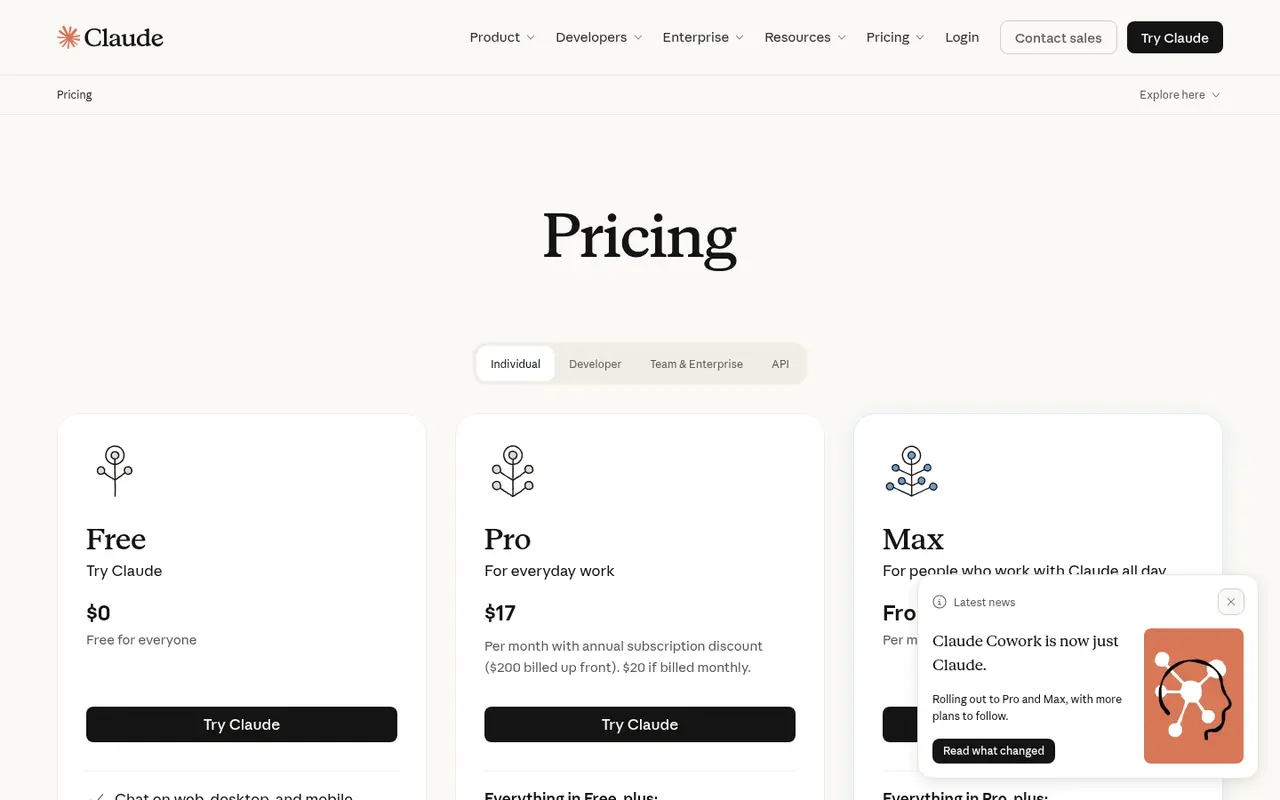
| Free | $0 | Chat on web, desktop and mobile; search, files, code; memory; app connectors |
| Pro | $20/month, or $17/month billed annually ($200 up front) | More usage, Projects, more models, Claude Code, Claude in Chrome and Microsoft 365 |
| Max | From $100/month (5x usage; the 20x tier costs more, check vendor site) | Much more usage, higher output limits, priority access, monthly API credits |
Prices exclude applicable tax. Team and Enterprise plans are separate. Enterprise is listed at $20 per seat per month plus usage.
Pricing at a glance
Billed monthlyBilled yearly
- FreeWeb, desktop, mobile; search, files, memoryFree
- ProMore usage, Projects, more models$20/mo$17/mo
- Max 5x5x Pro usage$100/mo
- Max 20x
Higher tier of Max; check vendor site
Using it as a writer
- Set up a Project per manuscript with your outline, character sheet and a short style guide: point of view, tense, banned words, comparable authors.
- Ask for critique in layers. Ask for structure first, then scene goals, then line edits. Mixing all three in one request produces mushy feedback.
- Keep the final words yours. Use Claude to propose alternatives and explain what isn't working, then rewrite in your own voice.
- Plan around limits. For a full-manuscript read, split by act and summarise as you go, so you don't burn the five-hour window on one request.
- Check sources. Its web search is helpful, but verify any fact you'll print.
Strengths
- Strong long-form feedback and editing. Many writers prefer its tone for critique.
- Clear, published pricing with an annual discount.
- Capable free tier that includes search and memory.
- Projects make a light-weight story bible possible.
Writer's Toolbelt editorial scores
Claude scorecard
7.2/10
- Drafting and brainstorming8/10
- Editing and feedback9/10
- Research7/10
- Fiction-specific workflow4/10
- Value for money8/10
Weaknesses
- Usage limits on every plan, including weekly caps on paid plans.
- No manuscript structure or continuity tools.
- Max is expensive for individual writers.
- General-purpose output still needs heavy voice editing.
How it compares
- Claude vs ChatGPT. They are similar in shape. ChatGPT has more image and voice features, while writers often reach for Claude for critique. See ChatGPT vs Claude.
- Claude vs Gemini. Gemini integrates with Google Docs and Drive. Claude's Projects play a similar context role.
- Claude vs Sudowrite. Sudowrite uses Claude models among others, inside a fiction-specific interface with a Story Bible.
Feature comparison
General AI assistants compared
| Feature | ChatGPT | Claude | Gemini | HyperWrite | Notion AI |
|---|---|---|---|---|---|
| Free plan | Yes | Yes | Yes | Yes | Yes |
| Lowest listed paid price | Not listed | Yes$17 | Yes$4.99 | Yes$16 | Yes$10 |
| All paid tiers have published prices | PartlySome tiers: contact sales or check vendor site | PartlySome tiers: contact sales or check vendor site | Yes | Yes | PartlySome tiers: contact sales or check vendor site |
| Competes with ProseEngine (we disclose) | Yes | Yes | Yes | Yes | Yes |
Verdict
Claude is one of the best general assistants for revision and feedback, and Pro at $17–$20 a month is a reasonable add-on for serious writers. If you want structured drafting with continuity, use it alongside a fiction workspace rather than instead of one.
FAQ
Is Claude free? Yes. The free plan includes chat, web search, files, code and memory, with usage limits.
How much is Claude Pro? $20 a month, or $17 a month billed annually ($200 up front), excluding tax.
What happens when I hit the limit? Limits reset on a rolling five-hour window, and paid plans also have weekly limits. Anthropic's FAQ explains the options.
Can Claude read my whole novel? It can handle long documents, but usage limits apply. Splitting a manuscript into parts is more reliable.
Nearby on the shelf
Drafting
ChatGPT
The general assistant most writers already have open. Useful for brainstorming, blurb variants, and line rewrites if you paste the scene and say what you want. It does not hold a novel together unless you build that memory yourself with projects or files, and it will invent sources if you let it.
Best for Writers who want one flexible assistant and will bring their own outline, pages, and skepticism.
FreemiumFiction and nonfictionDrafting
Gemini
Google's assistant, practical if your research and drafts already live in Docs or Drive. It will brainstorm and rewrite like the other general models, with the same habit of sounding finished before the thinking is. For source-grounded reading, NotebookLM is the closer sibling and is listed on its own.
Best for Writers already working in Google's tools who want a second model without a new app.
FreemiumFiction and nonfictionDrafting
HyperWrite
A browser assistant for rewriting sentences and producing short drafts in the page you are already on. It is built for emails, posts, and articles more than for an 80,000-word novel. Fine as a line-level spare, not as the place you keep the book.
Best for Short-form drafts and quick rewrites, especially outside a dedicated writing app.
FreemiumNonfiction