Voice and other formats
TaleScene
TaleScene turns a story you wrote into a screenplay with a cast, a shot list, and dialogue, then a storyboard that locks character faces, then a voiced film of several scenes. It does not edit a manuscript or draft the prose. You keep the story you submit, and the terms say you may use the generated storyboards commercially. If you accept a free preview clip, TaleScene may show that clip and its film page in the public Gallery until you make it private or delete it.
Best for
Fiction writers and storytellers who want a short story they wrote turned into a storyboard and a voiced film.
Pricing
Freemium. Free to start, no card. New accounts get 20 credits once: a script is 4, each AI character is 2, and each keyframe is 2, which the pricing page says is enough for a script and a storyboard. Voiced video is one-time packs, not a subscription. On 1 November 2026 the packs were Starter $19.90 for 200 credits, Film $49.90 for 700, Studio $99.90 for 1,600, and Premiere $199.90 for 3,500, in USD plus local tax. The cards print those prices as $19.9, $49.9, $99.9, and $199.9. Credits last 1 year. Video costs 4 to 30 credits a second by engine (MiniMax, Kling, Seedance). Free preview clips are watermarked until the account buys something. Failed renders refund the credits. Within 3 days you can move to a larger pack and pay only the difference. The FAQ still says an existing subscription, if you have one, keeps renewing.
Checked 1 November 2026. Plans move. The vendor's page wins an argument with this one.
Good to know
At a glance
- Availability
- Country blocks: not stated. The terms require a Google account. The site does not name a company. The footer says © 2026 TaleScene, and support is support@talescene.com. The domain was registered on 8 July 2026.
- Platforms
- Website.
- Languages
- The home page says any language works, and names English, Spanish, Chinese, Japanese, Portuguese, and more for scripts and subtitles.
- Launched
- Launched not stated
- Independent reviews
- GeekChamp published an AI-assisted review (facts read 21 September 2026) that scores TaleScene 6.8 out of 10. The page says a maker can pay for an editorial review. It lists Starter at $19.99, and one row says $19.99 a month. On 1 November 2026 the vendor table showed one-time packs from $19.90.
- AI training and retention
- The privacy policy, updated 19 September 2026, does not say whether user content trains models and offers no opt-out. It says data is used to improve the service and the quality of what it generates. Generation runs through Kie.ai, fal.ai, OpenAI, Google Gemini and OpenRouter. Account deletion on request removes stories, generated files and uploads.
In-depth review
TaleScene review
Last checked 1 November 2026 against the vendor's public pages. Prices and features change; check the vendor before you buy.
Writer's Toolbelt review
TaleScene
A story you wrote becomes a screenplay, a storyboard with locked faces, and a voiced film. It does not draft the prose. The packs are one-time.
- free credits, once, no card
- Starter pack, 200 credits, once
- before pack credits expire
What it is
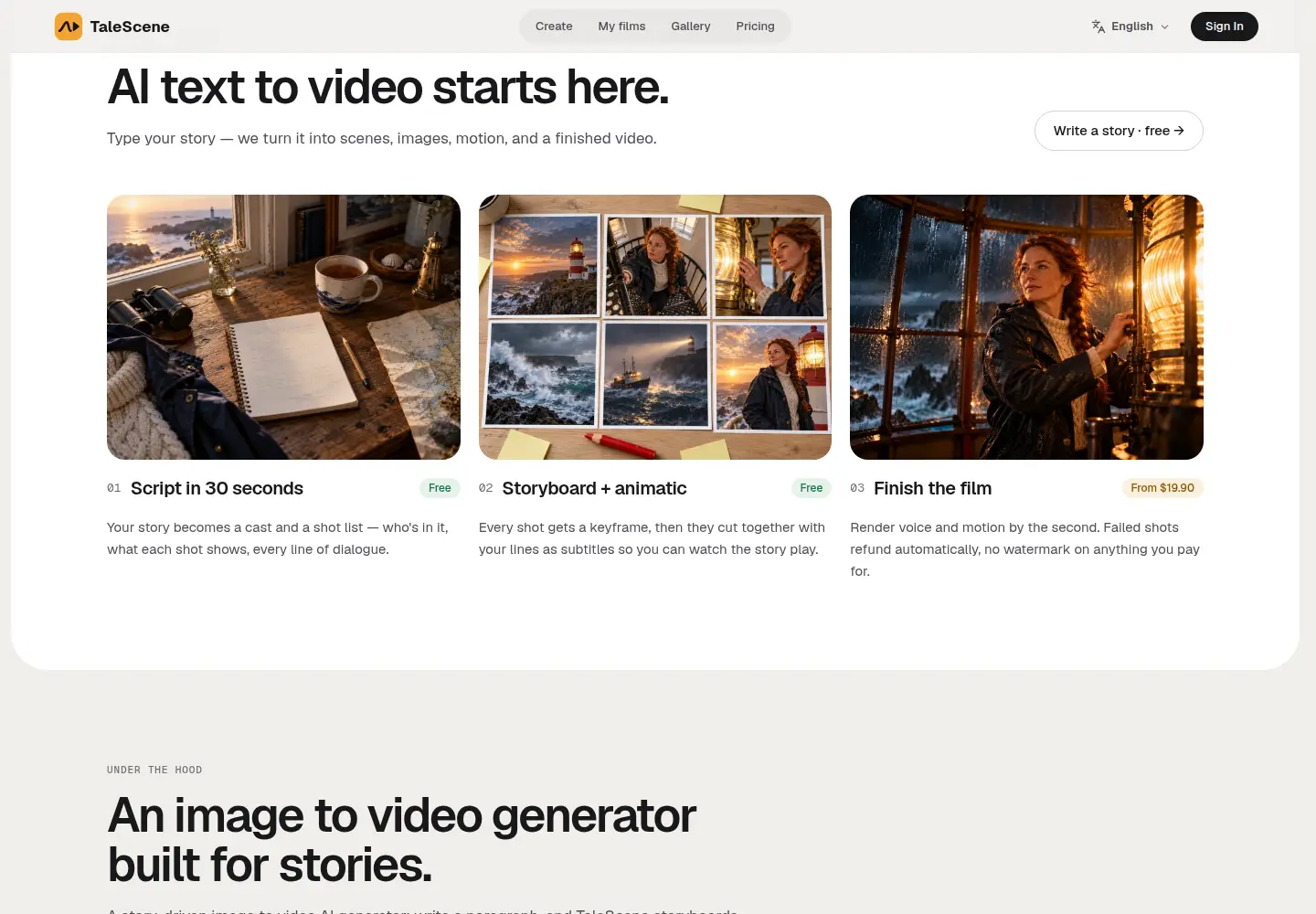
TaleScene turns a written story into a screenplay, then a storyboard, then a voiced film. The home page's line is to write a paragraph and get a storyboard, an animatic, and a voiced film, with the same face in every shot. The first step is a cast, a shot list, and the lines of dialogue. The second step is a keyframe for every shot, cut together with those lines as subtitles. The third step renders voice and motion by the second.
It is not a manuscript editor, and it does not draft the prose. You still write the story. The terms, updated 22 October 2026, call it a platform that converts text stories into visual scenes, and they list script generation, image generation, and story management. The home page says two or three sentences is plenty, and that any language works.
This review is what those public pages said on 1 November 2026. It did not open an account, submit a story, or buy a pack.

Who it's for
- Fiction writers and storytellers with a short story already written. The job is a screenplay, a storyboard with locked character faces, and a voiced film of several scenes. The home page says a paragraph is enough: who it is about, what happens, how it ends.
- Writers who will read the script before anything is rendered. The home page says each scene starts as a keyframe you can see, re-roll, or edit before paid credits animate it.
- A weaker fit if you want notes on a novel, a line edit, or a model that writes the chapter. TaleScene does not do that job. It is also a weaker fit if you need a named company on the contract. The pages we read do not name one.
Key features in practice
The home page describes four moves: write, cast, storyboard, animate. Characters are cast once and then locked into every keyframe and every clip. You can have the tool design a character, or use a saved cast. The pricing FAQ says you can upload one to three reference photos per character, of yourself or of people who gave permission, up to four people in a shot.
Styles named on the home page include live action, anime, watercolor, 3D animation, comic book, and claymation. The pricing table says all 12 visual styles are on every pack, including the free credits. Scripts and subtitles follow the language of the story. The home page names English, Spanish, Chinese, Japanese, Portuguese, and more.
A finished film is voiced, with subtitles, and downloads as one MP4. The home page says lines are spoken in the language you wrote. Paid renders have no watermark. Until the account buys something, a downloaded free preview clip carries a TaleScene watermark. Failed shots refund the credits.
The terms say you sign in with Google.
Pricing (checked 1 November 2026)
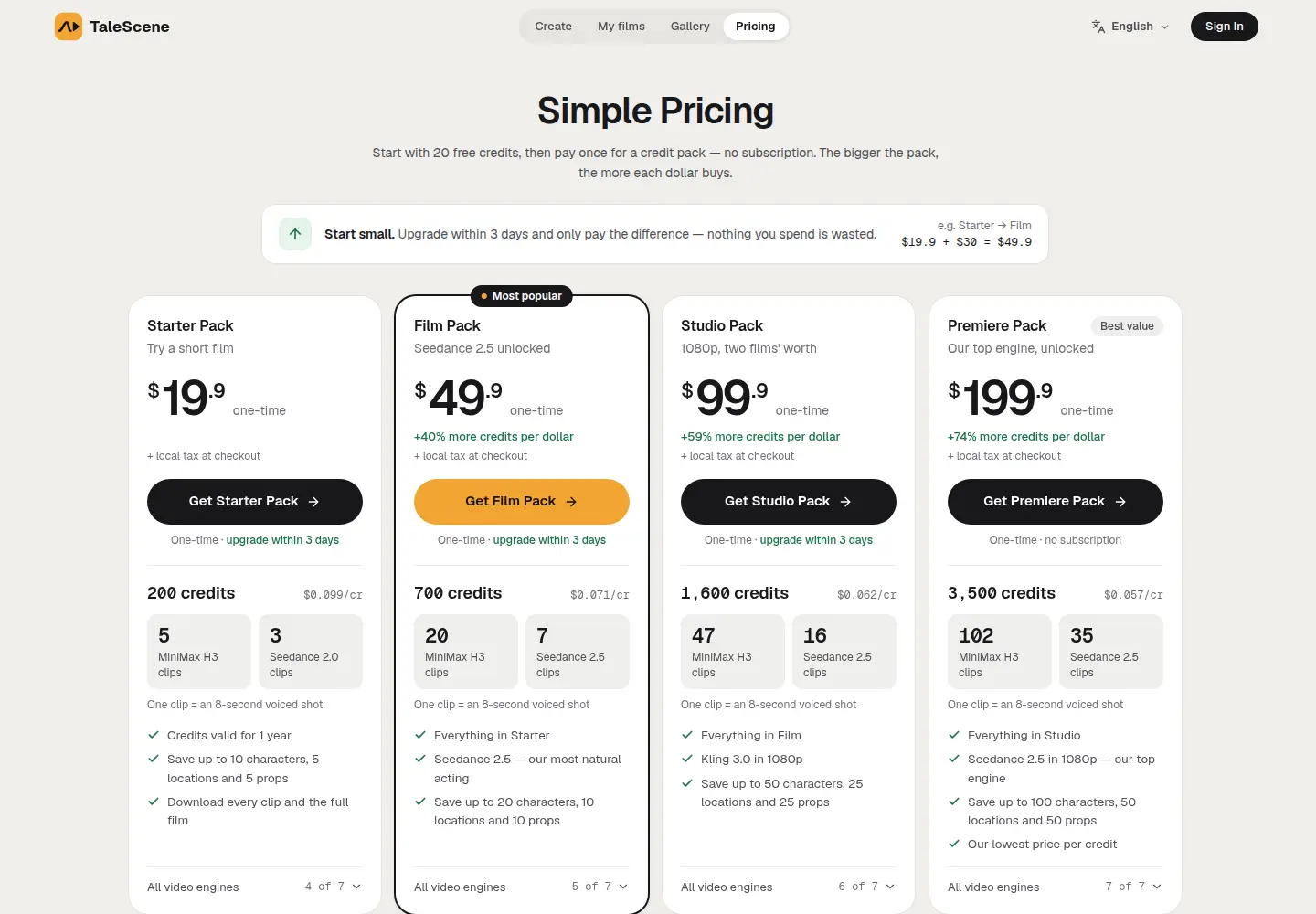
The pricing page says to start with 20 free credits, then pay once for a credit pack. It says there is no subscription. The home page FAQ says those 20 credits do not require a card, and that they cover a storyboard and keyframe previews. A script is 4 credits, each AI character is 2, and each keyframe is 2. The page says 20 credits is enough for a script and a storyboard. The free grant on its own rarely covers a full film. The terms say the same.
| Pack | Price | Credits | What the page adds |
|---|---|---|---|
| Free | $0, no card | 20, once | Script and storyboard. Video engines are not included. |
| Starter | $19.90 once | 200 | MiniMax H3, Kling 3.0, Seedance 2.0, and Seedance 2.0 Fast. Up to 10 saved characters. |
| Film | $49.90 once | 700 | Seedance 2.5 at 720p. Up to 20 saved characters. |
| Studio | $99.90 once | 1,600 | Kling 3.0 at 1080p. Up to 50 saved characters. |
| Premiere | $199.90 once | 3,500 | Seedance 2.5 at 1080p. Up to 100 saved characters. |
The cards print $19.9, $49.9, $99.9, and $199.9, each marked one-time, plus local tax at checkout. The comparison table on the same page prints $19.90, $49.90, $99.90, and $199.90. Credits last 1 year from purchase. A pack's engines and library room last that same year. Packs stack. Within 3 days of a purchase you can move to a larger pack and pay only the difference. The page's example is Starter to Film: $19.9 plus $30 equals $49.9.
Video is priced by engine and length, with voiced audio included. The pricing FAQ lists the per-second rates. An 8-second clip on the table also includes the 2-credit keyframe.
| Engine | Credits a second | 8-second clip on the table | Packs |
|---|---|---|---|
| MiniMax H3, 768p | 4 | 34 | Starter and up |
| Kling 3.0, 720p | 4 | 34 | Starter and up |
| Seedance 2.0 Fast, 720p | 5 | 42 | Starter and up |
| Seedance 2.0, 720p | 8 | 66 | Starter and up |
| Seedance 2.5, 720p | 12 | 98 | Film and up |
| Kling 3.0, 1080p | 6 | 50 | Studio and up |
| Seedance 2.5, 1080p | 30 | 242 | Premiere |
Shorter shots cost less, in proportion. A motion reference video adds a per-second charge on the engines that accept one. A voice reference is free. The page says the preview shows the total for the whole film before you render. Downloading the MP4 or the keyframes does not cost extra credits.
The terms still describe paid subscriptions, and they say unused subscription credits roll over while a subscription stays active. The pricing FAQ answers "I already have a subscription" with: nothing changes, the plan keeps renewing, and unused subscription credits keep rolling over while it stays active. The packs on the page are the new purchase. An older subscription, if the account has one, is a separate bill.
Payment is by card. The FAQ also names the payment provider's page, and the privacy policy names Stripe, PayPal, and Creem. TaleScene says it does not see the card details. Tax is added at checkout.
Pricing at a glance
- Free20 credits once, no card. Script and storyboard.Free
- Starter200 credits
$19.90 once
- Film700 credits
$49.90 once
- Studio1,600 credits
$99.90 once
- Premiere3,500 credits
$199.90 once
Using it as a writer
- Spend the 20 free credits on a story you already wrote. That grant is once, with no card. It is for the script and the storyboard, not for the voiced film.
- Read the screenplay before you render. The home page says you can change a keyframe, a prompt, or a line before paid credits animate the shot. A wrong face is cheaper to catch there.
- Read the Gallery line before you accept a free preview clip. The terms say accepting one grants TaleScene a non-exclusive, royalty-free licence to show that clip and its film page in the public Gallery, under your profile name. You can make it private or delete it. Films from accounts that have paid are not the ones the editors feature. Until the account buys something, the downloaded preview is watermarked.
- Price the engine before you buy a pack. Four credits a second and 30 credits a second are both on the same table. Seedance 2.5 at 1080p is the Premiere engine, at 30 credits a second. The page says the preview total is shown before you render.
- Send a deletion request to support@talescene.com. The contact page says to use the subject Privacy. The privacy policy says deleting the account removes the profile, the stories, the generated files, and the uploads.
Strengths
- The pipeline is printed. Script, storyboard, then voiced shots. The free steps and the paid step are marked on the home page.
- The pack prices are printed, and they are one-time. $19.90, $49.90, $99.90, and $199.90, with the credit counts beside them. Failed renders refund the credits. An upgrade inside 3 days costs the difference.
- You keep the story. The terms say you retain ownership of the stories you submit. They also say you may use, share, and commercially exploit the storyboards, and that TaleScene does not claim ownership of those storyboards. The home page FAQ says videos you generate are yours to publish and monetize.
- The privacy policy names the processors, and analytics wait for a yes. Generation runs through Kie.ai, fal.ai, OpenAI, Google Gemini, and OpenRouter. Stories sit in Supabase. Generated files and uploads sit on Cloudflare R2. Google is the sign-in. Google Analytics and Microsoft Clarity load only when analytics cookies are accepted. On 1 November 2026 the home page showed Reject analytics and Accept analytics, and it said the current choice was not set. Deletion is a request to support@talescene.com.
Writer's Toolbelt editorial scores
TaleScene scorecard
6.4/10
- Story to film, as described7/10
- Price clarity7/10
- Privacy, as written5/10
- Rights, as written6/10
- Fit when you already wrote the story7/10
Weaknesses
- The privacy policy does not say whether your stories train a model, and it offers no opt-out. It does say data is used to improve the service and the quality of what it generates. That sentence is broad. The training question is unanswered.
- The operator is not named. The footer says © 2026 TaleScene. Support is support@talescene.com. The contact page uses that same address for support, privacy, and press. The public registration record dates talescene.com to 8 July 2026. It names the registrar, not a company that runs the product. The privacy policy names Cloudflare for hosting and storage. That is a processor, not an operator. This is a very new product.
- A free preview is not a private file. Accepting it is permission to show the clip and the film page in the Gallery. The watermark stays until the account buys something. The terms also say the same Gallery licence covers free preview clips made before that clause was added.
- The commercial line is in two places, and they are not the same sentence. The terms' ownership section is about storyboards. The home page FAQ says the videos are yours to publish. Read both before a film goes on sale.
- An old subscription can still renew. The pricing page sells packs and says there is no subscription. The FAQ says an existing subscription keeps renewing, with monthly credits. If an account already has one, the "no subscription" line is about the packs, not about that older plan.
How it compares
- TaleScene vs ElevenLabs. ElevenLabs is a voice studio for narration you generate or clone, billed in credits on a subscription. TaleScene is a short film from a story, with pictures, locked faces, and a voice on each shot, billed as a one-time pack. See the ElevenLabs review.
- TaleScene vs Leonardo. Leonardo is an image studio for cover concepts and character art, with its own token bank. TaleScene locks a face inside a storyboard and then a film. See the Leonardo review.
- TaleScene vs Descript. Descript edits audio you recorded, by editing the transcript. TaleScene generates the clips. See the Descript review.
Verdict
TaleScene is for a short story that already exists, when the next thing you want is a screenplay, a storyboard, and a voiced film. The 20 free credits, with no card, are the part you can look at before you pay. They cover the script and the storyboard. The voiced film is a pack, from $19.90 once, and the engine you pick changes the credits per second from 4 to 30.
Keep the story you submit. Read the Gallery sentence before you accept a free preview. The privacy policy is clear about cookies, processors, and deletion, and it is silent on training. The site does not name the company behind the product, and the domain dates from July 2026. If you wanted a manuscript editor, this is the wrong shelf.
FAQ
Is TaleScene free? The script and the storyboard are. A new account gets 20 credits once, with no card. A script is 4 credits, each AI character is 2, and each keyframe is 2. Voiced video spends more credits than that grant usually covers. Free preview clips are watermarked until the account buys something.
How much does a voiced film cost? On 1 November 2026 the packs were one-time, in USD plus local tax: Starter $19.90 for 200 credits, Film $49.90 for 700, Studio $99.90 for 1,600, and Premiere $199.90 for 3,500. Credits last 1 year. Video costs 4 to 30 credits a second by engine. The pricing page says there is no subscription. Its FAQ says an existing subscription, if the account has one, keeps renewing. Failed renders refund the credits.
Does TaleScene write the story? No. You write the story. TaleScene turns it into a screenplay (cast, shot list, dialogue), then a storyboard, then a voiced film. It is not a manuscript editor.
Who owns the story and the film? The terms, updated 22 October 2026, say you keep the stories you submit. They say you may use the generated storyboards commercially, and that TaleScene claims no ownership of those storyboards. The home page FAQ says videos you generate are yours to publish and monetize. Accepting a free preview clip grants TaleScene a non-exclusive licence to show that clip and its film page in the public Gallery. You can make it private or delete it. Films from paid accounts are not featured.
Does TaleScene train on my story? The privacy policy, updated 19 September 2026, does not say, and it offers no opt-out. It says data is used to improve the service and the quality of what it generates. Generation runs through Kie.ai, fal.ai, OpenAI, Google Gemini, and OpenRouter. Analytics cookies load only with consent. Account deletion on request removes the profile, the stories, the generated files, and the uploads.
Who runs TaleScene? The site does not say. The footer is © 2026 TaleScene. Support, privacy, and deletion requests go to support@talescene.com. The domain was registered on 8 July 2026. Country blocks are not stated. Sign-in is with Google.
Free guide
The 10 best free AI tools for writers
Join the Writer's Toolbelt newsletter for a short note when the shelves change, and get the free PDF guide.
Nearby on the shelf
Audio and adaptation
Narration and voice
Descript
Edit recorded audio by editing the transcript. Cut a retake by deleting a sentence. Regenerate, the changelog's name for the older Overdub feature, can patch a flubbed word in your own voice, which is either a gift or a temptation depending on how honest the recording should stay. Built for people who record themselves, not for a fully synthetic cast.
Best for Authors who record their own audiobook or podcast and want to edit sound the way they edit a document.
FreemiumFiction and nonfictionAudio and adaptation
Narration and voice
ElevenLabs
The narration tool writers mean when they say the voice finally sounds human. You can clone a voice or cast from a library and generate chapter audio. Credits disappear on long books, and a retail audiobook has legal and quality bars this preview does not clear by itself. Read the license before you sell anything.
Best for Audiobook prototypes and performance-quality narration, after you have read the commercial terms.
FreemiumFiction and nonfictionAudio and adaptation
Narration and voice
Murf
A voiceover studio with a large voice library, timing controls, and a timeline. Better for trailers, courses, and polished spots than for cloning your own reading voice. A full audiobook is possible and tedious: you will still direct pronunciation, pauses, and the sentences the model emphasizes wrong.
Best for Trailers, course audio, and controlled narration when you want a studio instead of a clone of your voice.
SubscriptionFiction and nonfiction