After the draft exists
DeepL Write
Rewrite suggestions from the company behind DeepL translation. It is aimed at clearer phrasing, not plot. Particularly useful if you draft between languages or want a second wording that is conservative rather than clever. It will happily smooth a sentence that was supposed to be sharp.
Best for
Nonfiction clarity, and writers moving between languages who want phrasing help rather than a story engine.
Pricing
Freemium. Free rewrite suggestions with limits. DeepL Pro raises caps for people who already pay for translation.
Listing checked 14 October 2026. Plans move. The vendor's page wins an argument with this one.
In-depth review
DeepL Write review
Last checked 14 October 2026 against the vendor's public pages. Prices and features change; check the vendor before you buy.
Writer's Toolbelt review
DeepL Write
DeepL's AI editor. Clean corrections and natural rephrasing, especially strong for writers working in a second language.
- free Write in the browser
- Write Pro add-on, per month (annual)
- day free trial on Pro plans
What it is
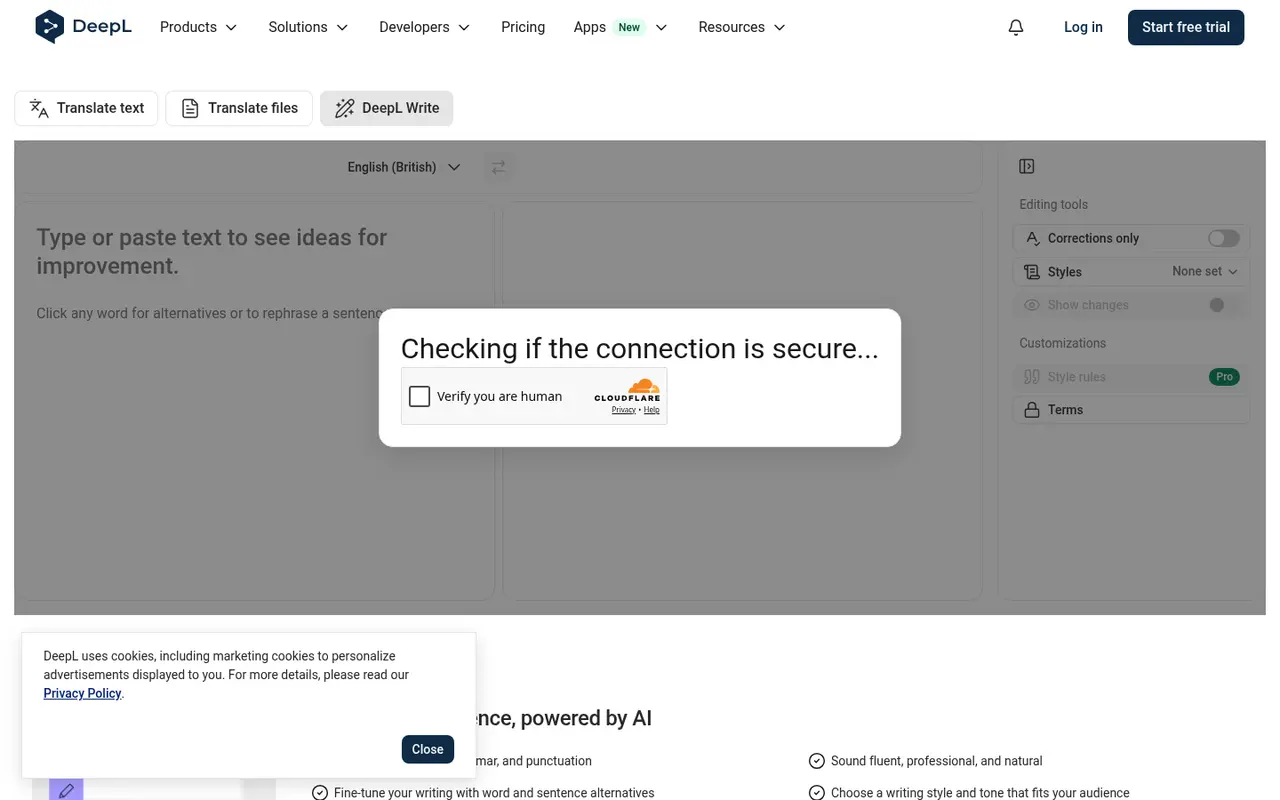
DeepL Write is the writing assistant from DeepL, the translation company. Paste or type text and it suggests improvements to "spelling, grammar, and punctuation", helps you "sound fluent, professional, and natural", and offers word and sentence alternatives when you click on any word. It has editing modes such as Corrections only and Styles, and Pro adds style rules and terms.
Who it's for
- Writers working in a second language, such as English or German, who want native-sounding sentences.
- Nonfiction and business writers polishing articles, pitches and newsletters.
- Authors preparing translated editions alongside DeepL Translator.
It is not a developmental or fiction-craft tool.
Key features in practice
- Improved results with "Show changes", so you see exactly what was edited.
- Corrections only mode, for when you want fixes without stylistic rewriting. This is useful for fiction, where voice matters.
- Styles and tones for choosing a register.
- Click-to-rephrase alternatives for a single word or a whole sentence.
- Customizations. Style rules and a terminology list (Pro), so it respects house style or invented words.
- Privacy. DeepL's Pro plans list "No data training".
Pricing (checked 14 October 2026)
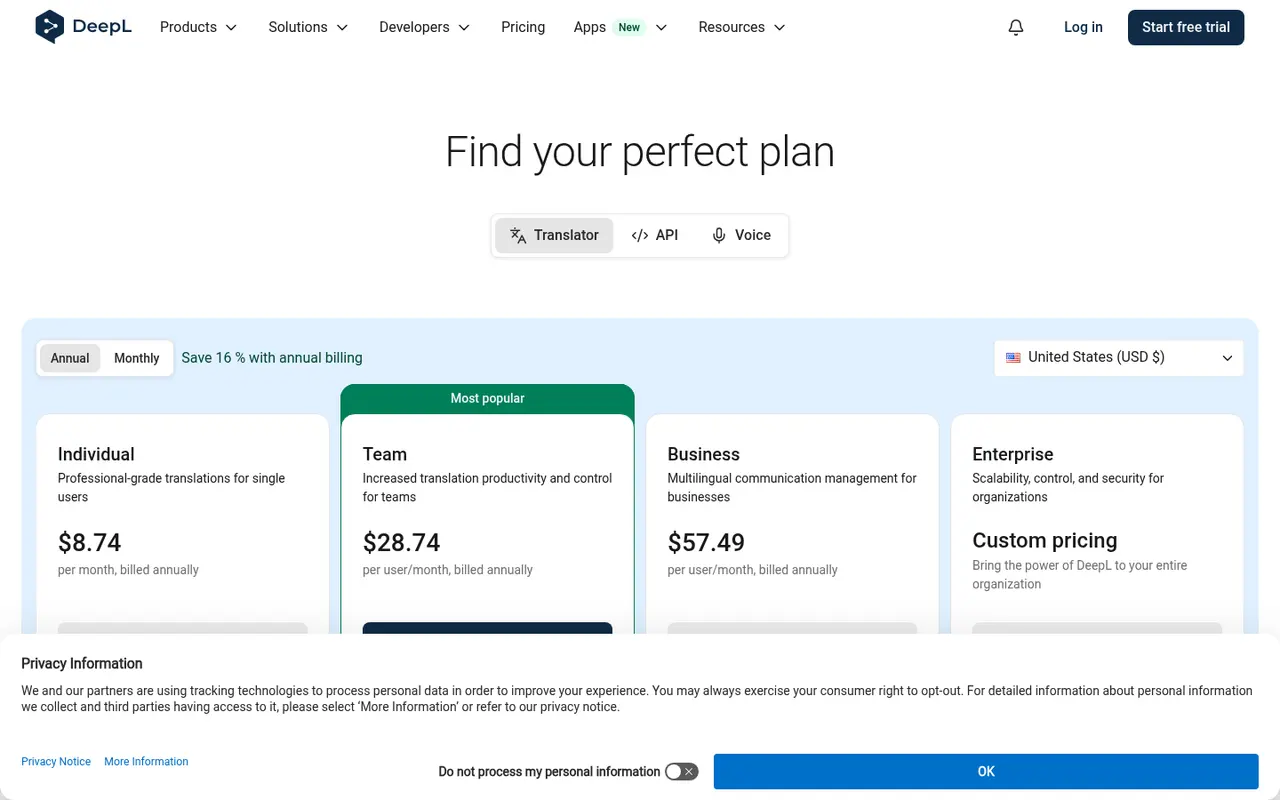
DeepL Write has a free browser version. Write Pro is included in DeepL's paid Translator plans, or added on for $7.49 per user per month (annual).
| Plan | Price (annual billing) | Notes |
|---|---|---|
| Free | $0 | DeepL Write in the browser; 50,000 translation characters/month on DeepL Free |
| Individual | $8.74/month | Write Pro, 300,000 characters, 3 file translations, no data training |
| Team | $28.74/user/month | Write Pro, 1M characters/user, bulk file translation |
| Business | $57.49/user/month | Unlimited characters, shared style rules |
The page says annual billing saves 16%, and paid plans start with a 30-day free trial.
Pricing at a glance
- FreeDeepL Write in the browserFree
- IndividualIncludes Write Pro, 300k translation chars$8.74/mo
- TeamIncludes Write Pro, 1M chars/user$28.74/mo
- BusinessUnlimited chars, shared style rules$57.49/mo
Using it as a writer
- Use "Corrections only" on fiction so your voice survives. Then accept rephrasings case by case.
- Add your invented terms (character names, places) via terms or style rules on Pro, so they stop being "corrected".
- Turn on "Show changes" and review every edit. Treat it like a copy-editor's markup.
- Draft in your native language, then translate and polish with Write, if you're producing an English edition yourself. Have a native reader check the result.
- Check privacy settings. Pro plans state no data training, which is a good reason to pay before pasting a manuscript.
Strengths
- Very natural phrasing, especially in European languages.
- A free tier you can use straight away.
- No-training guarantee on Pro.
- Pairs with DeepL Translator for multilingual authors.
Writer's Toolbelt editorial scores
DeepL Write scorecard
7.4/10
- Correction accuracy8/10
- Natural rephrasing9/10
- Second-language support9/10
- Fiction-specific feedback3/10
- Value for money8/10
Weaknesses
- No story-level feedback. Pacing, plot and character are out of scope.
- Pro bundled with translation plans, which you may not need.
- Can flatten voice if you accept every suggestion.
How it compares
- DeepL Write vs Grammarly. Grammarly is more widely integrated across apps and offers more tone and clarity checks. DeepL Write is excellent for natural phrasing.
- DeepL Write vs LanguageTool. LanguageTool supports many languages with a generous free tier and browser extensions.
- DeepL Write vs ProWritingAid. ProWritingAid gives fiction-oriented style reports. DeepL Write doesn't.
Feature comparison
Manuscript feedback tools compared
| Feature | AutoCrit | Fictionary | Marlowe | DeepL Write |
|---|---|---|---|---|
| Free plan | Yes | No | Yes | Yes |
| Lowest listed paid price | Yes$15 | Yes$19 | Yes$29.95 | Yes$8.74 |
| All paid tiers have published prices | Yes | Yes | Yes | Yes |
| Competes with ProseEngine (we disclose) | Yes | Yes | Yes | No |
Verdict
DeepL Write is one of the best sentence polishers available, and a standout for second-language writers. Use the free version, and upgrade to Pro (or an add-on) when you need privacy guarantees and style rules.
FAQ
Is DeepL Write free? Yes, in the browser. Write Pro adds customisation and the no-training guarantee.
How much is Write Pro? It is included in DeepL Individual ($8.74 a month billed annually), or available as an add-on at $7.49 per user per month billed annually.
Will it change my writing style? Only if you let it. Use Corrections only and review every change.
Sources
Nearby on the shelf
Editing
AutoCrit
Fiction editing reports for dialogue, pacing, repetition, and overused phrasing, plus a story analyzer and an AI reader you can steer with instructions. The reports compare your draft with genre tendencies, which is a clue, not a verdict. It will not write the book for you.
Best for Novelists who want genre-aware notes on a complete draft, not a chatbot that continues the scene.
SubscriptionFictionDrafting
Claude
A general assistant that writers often prefer for long passages, tone, and a calmer revision pass. Projects can hold notes and chapters you upload. It is still a chat, not a novel app: continuity across a whole book is only as good as the pages you put in front of it.
Best for Drafting and revision when you want a careful reader more than a plot machine.
FreemiumFiction and nonfictionEditing
Fictionary
Story-structure software that visualizes a story arc and includes Edwina, an AI instructor for scene-level feedback. The useful part is seeing whether the draft has a shape. The classes, if you buy them, are people. Do not confuse the two.
Best for Novelists who want structure feedback while outlining and revising, with an optional human class on the side.
SubscriptionFiction