Getting words down
Prosematter
A book workspace from Berlin: a Codex for characters and world, boards and timelines, in-place line edits, and a roster of AI editorial personas that read the draft. Imports include Word and Scrivener; exports include EPUB and print PDF. Credits meter the AI, the public pages do not agree on the beta rating, and a full-book read is priced as a rough estimate rather than a fixed quote.
Best for
Fiction and nonfiction authors who want the manuscript, the notes, and an editorial pass in one browser project.
Pricing
Freemium. Editor, imports, and exports are free, with 500 welcome credits. Paid plans on 16 October 2026: Starter €10, Pro €20, Studio €40 a month (1,750 / 3,900 / 7,900 credits), or 10% less on a 12-month commitment. Credit top-ups exist. The pages also say "Free for 14 days."
Listing checked 16 October 2026. Plans move. The vendor's page wins an argument with this one.
In-depth review
Prosematter review
Last checked 16 October 2026 against the vendor's public pages. Prices and features change; check the vendor before you buy.
Disclosure: The person who runs Writer's Toolbelt also makes ProseEngine, an AI fiction-writing app that competes with Prosematter. This review sticks to verifiable facts and links its sources below.
Writer's Toolbelt review
Prosematter
A book workspace with a Codex, boards, and AI editors that read the draft. The editor is free. The reads spend credits.
- welcome credits on a new account
- Starter per month
- Pro per month
What it is
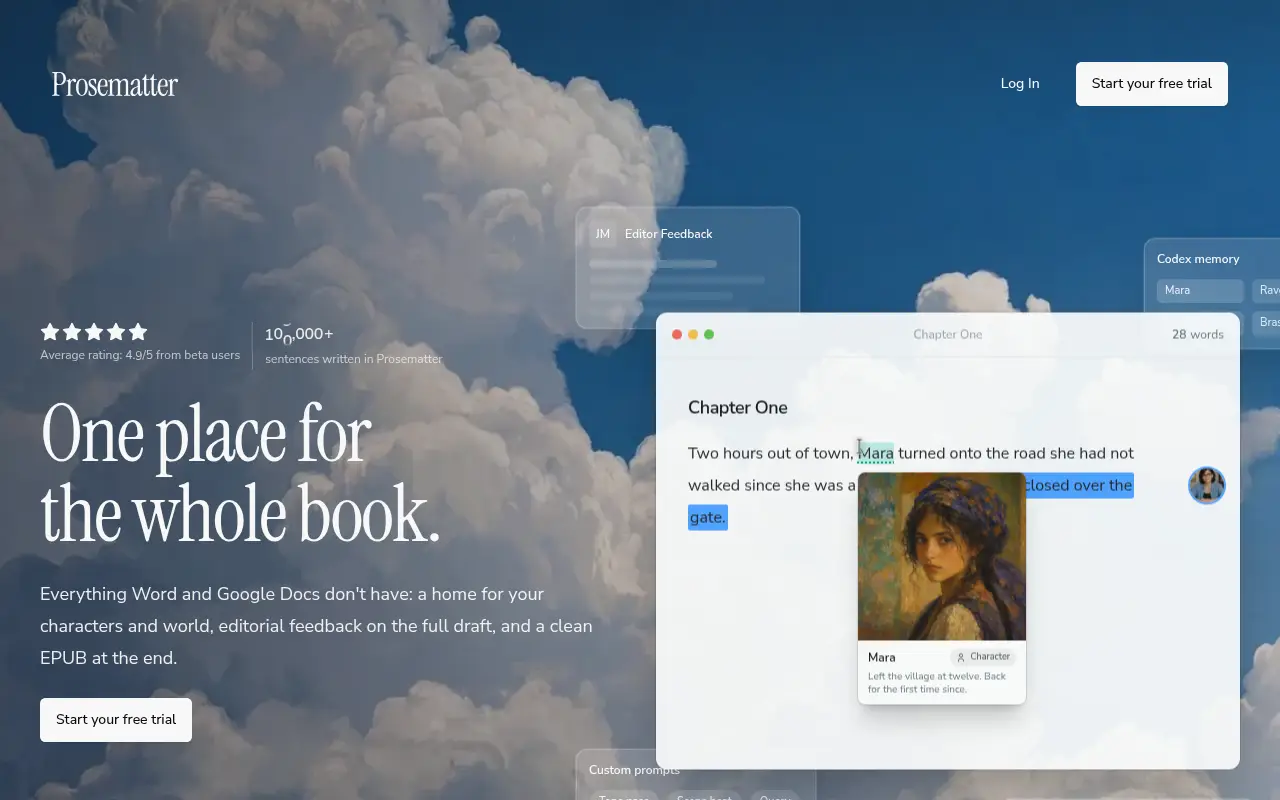
Prosematter is a browser workspace for a whole book. The home page's line is "one place for the whole book": chapters, a home for characters and world, editorial feedback on the full draft, and a clean EPUB at the end. The imprint lists the service provider in Berlin, at Schluchseestr. 26, 13469 Berlin, Germany. The site is published in English, German, French, Spanish, Italian, and Portuguese.
It is not a chat box you paste a chapter into. The editing page's comparison with ChatGPT is that Prosematter works inside the draft: select text, rewrite or insert in place, keep a voice note attached, and ask for editor-style feedback when the piece needs a read.
Who it's for
- Novelists and memoirists who already have chapters and are losing the notes. The home page is written against the spreadsheet of characters, the Notion world file, and the three documents named final.
- Nonfiction writers who want an argument tested. Several of the named editors are developmental and line editors for nonfiction, not only fiction coaches.
- Writers who revise alone. The pitch is a read in minutes rather than a critique swap that takes a month.
The home FAQ says it is built for people writing books, fiction or not, and for anyone who writes long things. It is a weak fit if you want a prose-generation playground, a local Scrivener project as the file of record, or a guarantee about how many credits one read of your book will cost. The "about 5 reads of a 90,000-word draft" line is the vendor's estimate for the Starter grant, not a quote.
Key features in practice
- Codex. Characters, places, and objects, with images, relations, and your own fields. When the name appears in a chapter, the note is beside it. The home page says book six still knows what you decided in book one. That is a continuity claim. Test it on two books before you trust it.
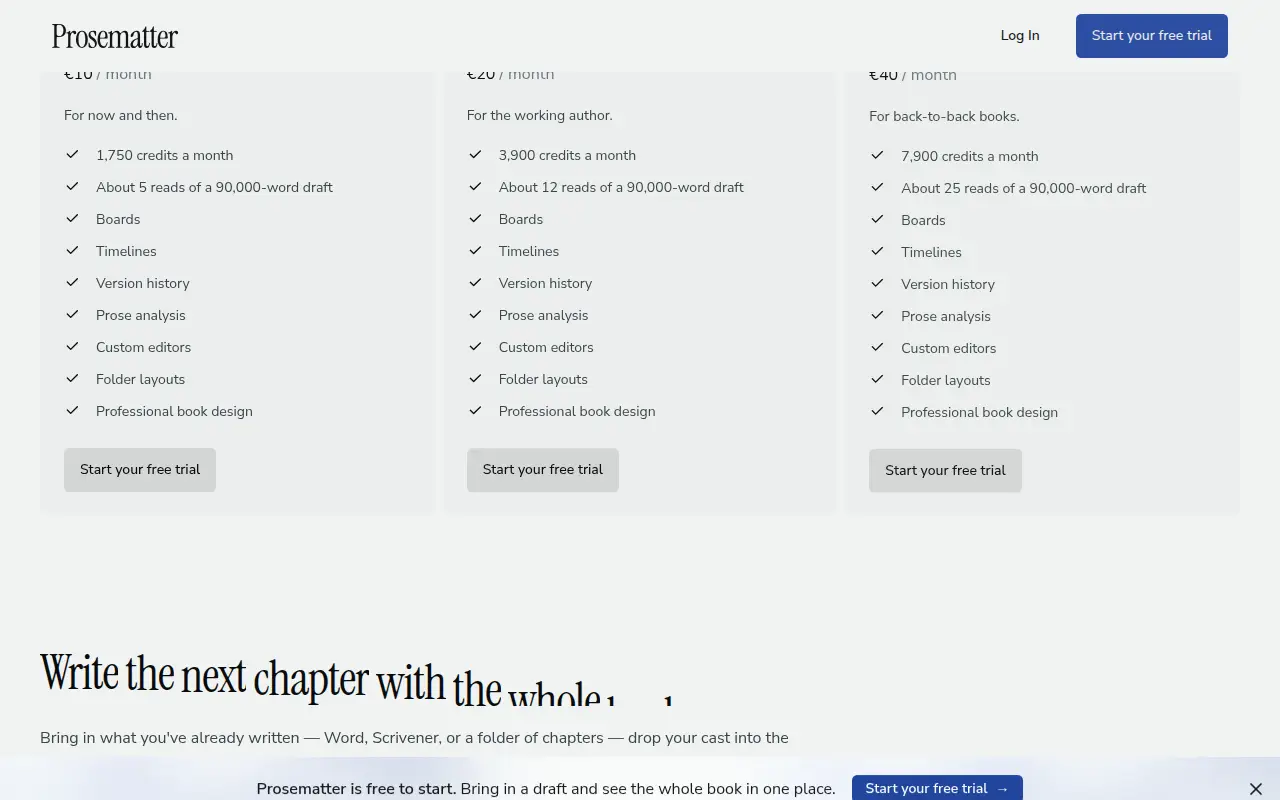
- Boards, timelines, and outlines. A board for who knows whom and which thread runs where. A timeline for the order events happened and a second one for the order the reader finds out. Chapter outlines as cards you can move on a grid or on lines. The pricing cards put boards, timelines, version history, prose analysis, custom editors, folder layouts, and "professional book design" on the paid plans, not on the free editor.
- In-place edits. Highlight a sentence and replace it where it sits, or insert a paragraph at the cursor. One-click actions cover grammar, phrasing, flow, tone, and punch. Instructions you repeat can be saved as a prompt.
- Writing Style. A short note on how you sound, used when Prosematter rewrites, so the result stays closer to your draft. The editing page says suggestions are tuned to your rhythm only if you teach it a sample, and that it rewrites the whole piece into a generic voice only if you ask it to.
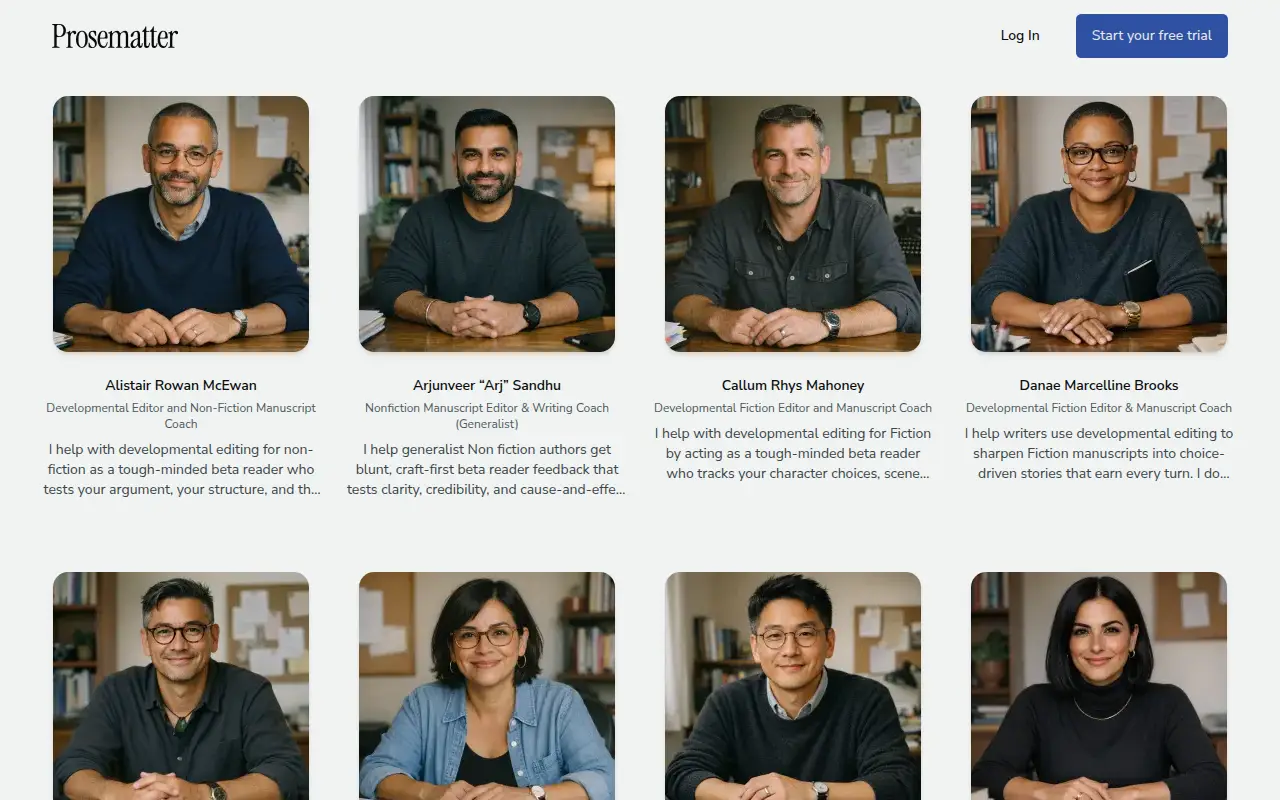
- AI editors. The editing page calls them personas with a voice and a brief. On 16 October 2026 the English roster at /en/editors listed 14 named editors, including Everett Dale Kwon (copy edit and fact-check), Marceline Ducharme and Michelle Yunjin Park (fiction), Elena Cruz (line edit, nonfiction), and Alistair Rowan McEwan (developmental nonfiction). A control on that page offered 52 German editors. The page says the roster is growing. Feedback can cover structure, pacing, and dialogue, and you can ask follow-up questions. Home-page sample comments are shown in the margin from named editors. Treat the samples as marketing, not as your report.
- Prose analysis. A panel for readability, tone, clichés, and word choice that re-reads as you type. The home page's example is a grade level, an adverb count, and a passive count. Paid plans include it.
- Collaboration. Invite a co-writer or a trusted reader. Their cursor moves in the paragraph you share, and comments land in the margin.
- Goals. A daily target, a streak, and a count of words over time. The home page frames this as the part that gets the book finished after the notes are in one place.
- Import and export. In: .docx, .odt, .rtf, .pdf, Markdown, a Scrivener project (.scriv), and pulls from Google Drive, OneDrive, Notion, Dropbox, or reMarkable. Out: EPUB, Word, a print-ready PDF in a Book or Manuscript layout, plus Markdown, RTF, ODT, and plain text. The FAQ says you can leave any time and the book stays yours.
- Who runs the models. The privacy policy says AI features send the necessary part of your input to OpenAI, Anthropic, Google (Gemini API), and Mistral for inference. Mistral is also the OCR provider. Hosting is DigitalOcean in Frankfurt and the database is Supabase in an EU region. OpenAI, Anthropic, Google, Stripe, Resend, and Cloudflare are named as US processors, with EU Standard Contractual Clauses. The policy says Prosematter does not train models on your private drafts and does not give those providers permission to train on your content, relying on standard API tiers. The terms repeat that private drafts are not used to train third-party foundation models unless a separate opt-in program says otherwise.
Pricing (checked 16 October 2026)
| Plan | Price | Credits | What the page adds |
|---|---|---|---|
| Start | €0 | 500 welcome credits, once | Editor, imports, and exports. The block also says "Free for 14 days." |
| Starter | €10/month | 1,750 a month | "About 5 reads" of a 90,000-word draft; boards, timelines, version history, prose analysis, custom editors |
| Pro | €20/month | 3,900 a month | "About 12 reads" of that draft; the same tools |
| Studio | €40/month | 7,900 a month | "About 25 reads"; the same tools |
Pricing at a glance
- Start500 welcome credits; editor, import, exportFree
- Starter1,750 credits/month; boards and timelines€10/mo
- Pro3,900 credits/month€20/mo
- Studio7,900 credits/month€40/mo
The home page says choose 12 months and save 10%, or top up credits once without those extra tools. It does not print the discounted euro amounts. Check checkout. The editing page is looser: "pay-for-what-you-use," "most full-book feedback runs land around €5, depending on draft length," and you can stay on pay-as-you-go with no subscription. The terms say credits have no cash value, are non-transferable, and may expire as disclosed at purchase, and that consumption rates can change.
Cancel from account settings. Paid plans auto-renew. EU consumers get the usual 14-day withdrawal note, which the terms say ends once you start immediate digital performance and have agreed to that. Price changes need 30 days' notice and apply on renewal.
The two "free" lines should be read together, not smoothed over. The FAQ says the editor, imports, and exports are free and every account gets 500 welcome credits. The pricing block and the editing page also say "Free for 14 days. Cancel anytime." If you need to know whether the editor stays free after day 14, check the vendor site. We are not going to guess which sentence wins.
The public pages also disagree about the beta social proof. The home hero showed an average of 0.0 from beta users and "1,000+ sentences written." The editing page showed 4.9/5 from beta users and "10,000+ sentences analyzed." Use neither number as a rating.
Using it as a writer
- Import a draft you can judge, a .docx or a Scrivener project, and put ten load-bearing facts in the Codex before you spend credits on a read.
- Save a Writing Style sample from your own prose before you accept an in-place rewrite. The editing page's promise is that the voice stays if you teach it.
- Ask one editor, then read the page it cites. The personas are specific (fact-check, line, developmental). A margin note that does not point at a sentence is not the product's own standard, if the sample comments are the guide.
- Price one full-draft read before you buy Studio. The "about 5 / 12 / 25 reads" lines are estimates for a 90,000-word draft. Your book is not that draft. The editing page's "around €5" is the same kind of estimate.
- Export an EPUB or a Word file before you depend on the account. The FAQ says you can.
Strengths
- The notes sit next to the chapter. Codex, boards, and two timelines are the part a normal document editor does not have.
- Feedback is inside the draft, with follow-up questions, not a chat transcript you paste back.
- A wide import list, including Scrivener and the drives people already use.
- A plain training answer, with the model vendors named.
- Fiction and nonfiction editors on the same roster, so a memoir is not forced through a novel coach.
Writer's Toolbelt editorial scores
Prosematter scorecard
7.6/10
- Manuscript workspace8/10
- Editorial feedback8/10
- Codex and planning8/10
- Ease of setup7/10
- Value for a long revision7/10
Weaknesses
- Credit cost per read is an estimate. "About five reads" and "around €5" can both be wrong for your file. The terms allow the rate to change.
- "Free" is said two ways. Welcome credits plus a free editor, and a 14-day trial line. Do not plan a year on the friendlier sentence until the app agrees.
- The beta rating on the public site does not agree with itself.
- Paid tools are bundled. Boards, timelines, version history, and prose analysis start with Starter, not with the free editor. A top-up buys credits without those tools.
- Web only. You can export. The live project is not a desktop file.
- Personas are still a model. A named editor with a worldview is a prompt with a biography. It is not a human developmental edit, and the home page is honest that a human edit costs more.
How it compares
- Prosematter vs LivingWriter. Both keep a manuscript, planning boards, and optional AI, and both export beyond the app. LivingWriter prices in dollars with a hard cap on AI requests except on Pro + AI. Prosematter prices in euros and meters credits, with a larger editorial roster. See the LivingWriter review.
- Prosematter vs Loreon. Loreon is a continuity checker against a structured bible, and the editor is free. Prosematter will also keep a Codex, and it is built to rewrite in place and to hand back editorial notes. If you want findings and no rewrite, Loreon is the narrower tool. See the Loreon review.
- Prosematter vs Sudowrite. Sudowrite is a fiction drafting studio. Prosematter will draft an insert, but the pages spend more words on revision, voice, and the full-draft read, and they explicitly include nonfiction. See the Sudowrite review.
- Prosematter vs ProseEngine. ProseEngine is made by the person who runs this site. See the disclosure above. It is a fiction studio with a codex, priced in euros, with a free plan. We are not picking a winner. Compare the free start on the same chapter.
Feature comparison
Fiction workspaces at a glance
| Feature | Sudowrite | Novelcrafter | Loreon | LivingWriter | Unsloppy | Prosematter |
|---|---|---|---|---|---|---|
| AI models included in the price | Yes30+ models plus Muse & Ballad | NoBring your own key | YesCredits pay for Anthropic API runs | YesIncluded; capped except on Pro + AI | YesHosted catalog; spent as Ink | YesCredits call the vendor's API providers |
| Bring your own API key | Not listed | YesHobbyist and up | Not listed | Not listed | Not listedPublic pages describe a hosted catalog | Not listedVendor names its own providers |
| Local models | Not listed | YesLocal AI support | Not listed | Not listed | Not listed | Not listed |
| Story bible / codex | YesStory Bible | YesCodex with progressions and relations | YesStructured canon the prose is checked against | PartlyElements board: people, places, objects | YesStory Canon; you approve each note | YesCodex for characters, places, objects |
| Series continuity | YesAll plans | YesShared codex across a series | YesCross-volume checks; one bible for a series | Not listedAppears-in tracking is per manuscript | PartlyPremium is pitched for a series; cross-book checks: check vendor site | YesHome page: book six keeps book-one decisions |
| Editable prompts with preview | PartlyVia plugins | YesCustom prompts and prompt preview | Not listed | Not listed | Not listed | PartlyReusable custom prompts; preview: check vendor site |
| Editorial feedback tools | YesDev edits, line edits, beta reads (Professional+) | PartlyWorkshop chat; advanced review marked planned | YesFindings cite passages; not a copyedit | PartlyAI Analysis on paid plans | PartlyHumanizer and proposal review; not a dev edit | YesNamed AI editors on the draft |
| Plan without AI | No | YesScribe, $4/mo | YesEditor is free; credits only for agent runs | NoEvery plan includes an AI allowance | NoFree still includes 36 Ink a day | YesEditor, imports, and exports are free |
| Team collaboration | Not listed | YesSpecialist plan | Not listed | YesComments and sharing; Free caps at 2 | Not listedTerms: stories stay private to the account | YesCo-writer cursors and margin comments |
| Free trial, no card | YesTrial length not stated | Yes21 days | PartlyFree editor; welcome credits (amount: check vendor site) | Yes7 days on Pro and Pro + AI | YesFree tier, no card | Partly500 welcome credits; card requirement: check vendor site |
Verdict
Prosematter is a revision desk that also holds the story bible. That combination is the reason to try it: the Codex, the board, and a read that stays in the file. The reason to be careful is the meter. Five hundred welcome credits will show you the shape of a report. They will not price a year of revision.
Start there. Import a chapter, keep one Codex entry, and ask for a single read. If the note points at the right sentence and the credit estimate is one you can live with, Starter at €10 is the plan that unlocks the boards. If the 14-day line and the free-editor line still disagree in the app, believe the app.
FAQ
Is Prosematter free? The home FAQ says yes to start: 500 welcome credits, and the editor, imports, and exports are free. The pricing block and the editing page also say "Free for 14 days." Check the vendor site for which limit applies after the credits are gone.
How much are the paid plans? On 16 October 2026: Starter €10, Pro €20, Studio €40 a month, with 1,750, 3,900, and 7,900 credits. A 12-month commitment is described as 10% less. The discounted totals were not printed on the cards we checked.
Does it train on my draft? The privacy policy says no, and that API content is not used to train the providers' foundation models. Named providers: OpenAI, Anthropic, Google (Gemini API), and Mistral.
Can I leave with the book? Yes, according to the FAQ. EPUB, Word, print-ready PDF, Markdown, RTF, ODT, and plain text.
Is it only for novels? No. The FAQ says it is for books, fiction or not.
Free guide
The 10 best free AI tools for writers
Join the Writer's Toolbelt newsletter for a short note when the shelves change, and get the free PDF guide.
Nearby on the shelf
Drafting
ChatGPT
The general assistant most writers already have open. Useful for brainstorming, blurb variants, and line rewrites if you paste the scene and say what you want. It does not hold a novel together unless you build that memory yourself with projects or files, and it will invent sources if you let it.
Best for Writers who want one flexible assistant and will bring their own outline, pages, and skepticism.
FreemiumFiction and nonfictionDrafting
Claude
A general assistant that writers often prefer for long passages, tone, and a calmer revision pass. Projects can hold notes and chapters you upload. It is still a chat, not a novel app: continuity across a whole book is only as good as the pages you put in front of it.
Best for Drafting and revision when you want a careful reader more than a plot machine.
FreemiumFiction and nonfictionDrafting
Gemini
Google's assistant, practical if your research and drafts already live in Docs or Drive. It will brainstorm and rewrite like the other general models, with the same habit of sounding finished before the thinking is. For source-grounded reading, NotebookLM is the closer sibling and is listed on its own.
Best for Writers already working in Google's tools who want a second model without a new app.
FreemiumFiction and nonfiction